The 3 Pinterest Pins You Need for Every Blog Post (If You Actually Want Clicks)
For the longest time, I thought Pinterest just… wasn’t working for me.
I was making pretty pins. I was posting consistently. Some pins got saves. Some got impressions. Occasionally one would take off.
But I was looking at all of those numbers as if they meant the same thing.
They don’t.
A pin can get thousands of impressions and hundreds of saves without sending much traffic to your website. Another pin can look much less impressive in Pinterest analytics and quietly send far more people to your blog.
Once I started looking at what people actually did after seeing each type of pin, my Pinterest strategy changed.
I still create three types of pins for my blog posts:
- A Click Pin to drive traffic
- A Curiosity Pin to stop the scroll
- A Save Pin to create something worth keeping
But now I judge each one by the job it was designed to do.
And recently, my RSS feed accidentally taught me there may be a fourth kind of pin worth paying attention to, too.
First: Pin Clicks and Outbound Clicks Are Not the Same Thing
This is probably the biggest thing I wish I had paid more attention to earlier.
A Pin click means someone clicked on the Pin to see it more closely.
An outbound click means someone actually left Pinterest and visited your website.
If your goal is blog traffic, those are very different actions.
A pin with hundreds of Pin clicks may look fantastic at first glance. But if only a handful of those people visit your website, it isn’t necessarily your best traffic driver.
That doesn’t make it a bad pin.
It just means it may be doing a different job.
1. The Click Pin: Your Traffic Driver
The Click Pin has one main goal:
Get someone from Pinterest to your website.
It should make the benefit of clicking immediately obvious, but here’s something I’ve changed my mind about:
Don’t give them the entire answer on the Pin.
You want someone to understand what they’ll get, while still having a reason to visit your post.
Some of my strongest traffic pins use a combination of:
aspirational image + relatable problem + unresolved promise
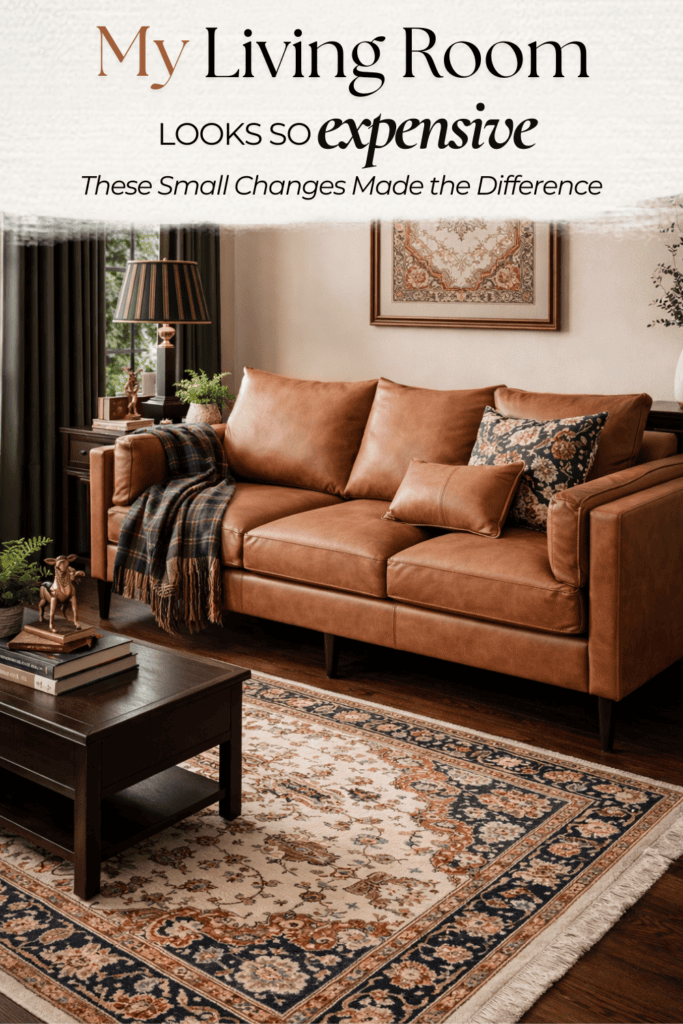
For example, one of my Ralph Lauren-inspired decor pins says:
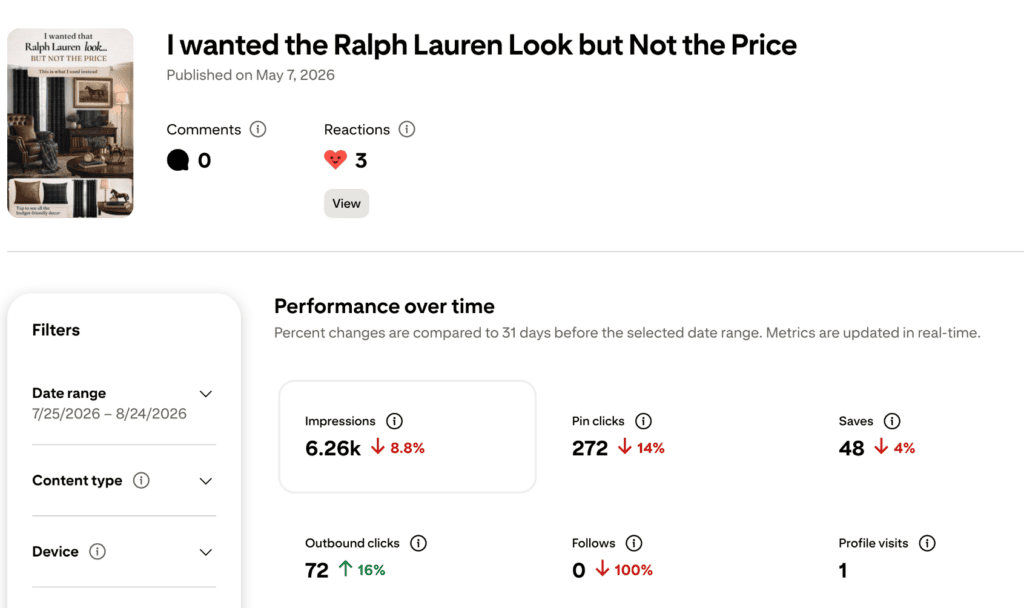
It doesn’t explain how I created the look.
That’s on the blog.
And the analytics showed me exactly why that matters.
Over one 30-day period, that Pin received:
6.26K impressions
272 Pin clicks
48 saves
72 outbound clicks
That’s an outbound click rate of about 1.1%.
Another Pin for my Coastal Grandma content used the headline:
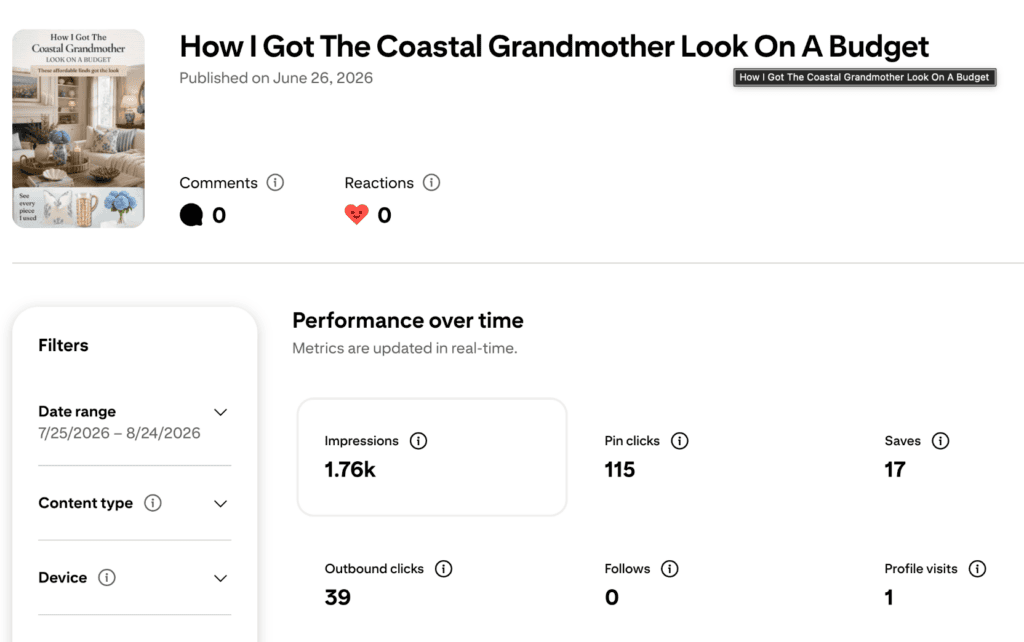
That Pin received:
1.76K impressions
115 Pin clicks
17 saves
39 outbound clicks
That’s about a 2.2% outbound click rate.
It didn’t have nearly as many impressions as some of my other pins.
It didn’t have nearly as many saves.
But it was very good at doing the thing I created it to do:
send people to my blog.
What I’m doing differently now
For a Click Pin, I look for a headline that tells someone:
I know what you want + I know what’s getting in your way + the solution is in this post.
Examples:
- I Wanted the Ralph Lauren Look… But Not the Price
- How I Got the Coastal Grandma Look on a Budget
- Make-Ahead Breakfast Sandwiches That Actually Reheat Well
- Easy Outdoor Party Games Everyone Will Actually Play
The benefit is clear.
The complete answer isn’t.
That’s the difference.
2. The Curiosity Pin: Your Scroll Stopper
The Curiosity Pin is still the pin that makes someone pause and think:
Wait… what?
This one can be more personal, unexpected or emotional.
Instead of explaining exactly what the post contains, it opens a little information gap.
Examples might be:
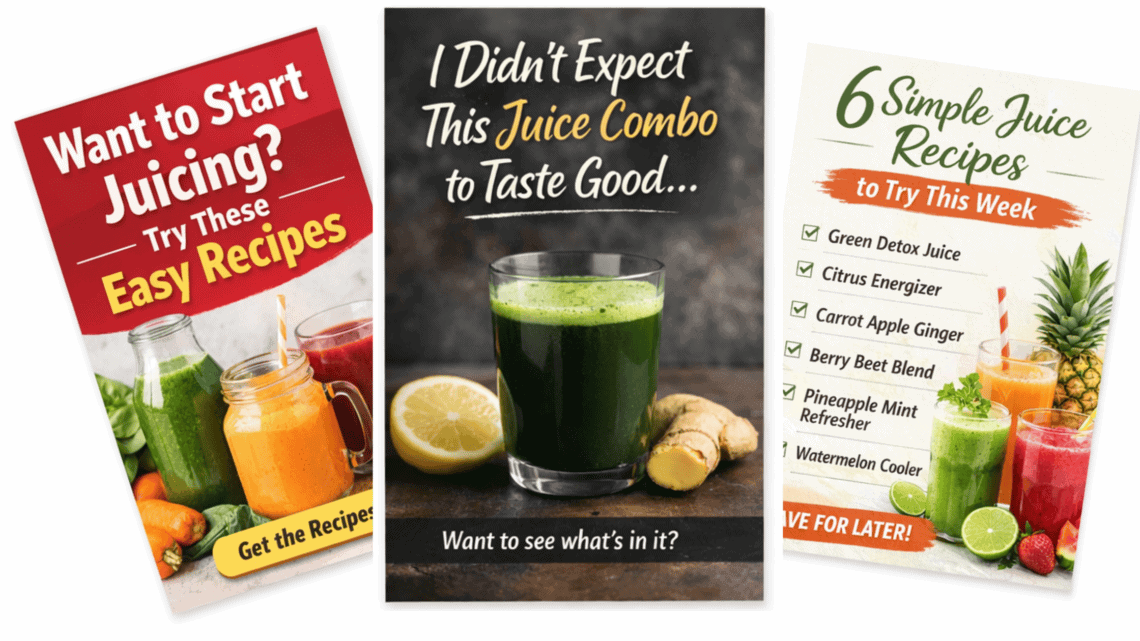
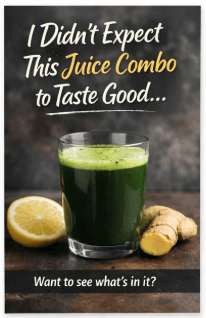
- I Didn’t Expect This Juice Combo to Be My Favorite
- This One Change Made My Living Room Feel Finished
- I Almost Didn’t Add This to the Room
- The Amazon Find I Didn’t Think I’d Use This Much
The goal here isn’t necessarily to rack up saves.
It’s to get someone interested enough to inspect the Pin and potentially continue to the article.
That’s why I pay attention to Pin clicks on these—but I also check outbound clicks before deciding that a Curiosity Pin was truly successful at generating traffic.
3. The Save Pin: Your Long-Term Pinterest Asset
Save Pins are useful.
They’re the checklists, color palettes, recipe collections, shopping guides and visual references someone thinks:
I’m going to need this later.
And Pinterest users really do behave differently with them.
One of my detailed Boho Picnic graphics includes the setup, food ideas, supplies and budget information right on the Pin.
In 30 days, it received:
6.58K impressions
420 Pin clicks
61 saves
5 outbound clicks
But it generated only 5 outbound clicks.
Those are great engagement numbers.
At first, that sounds disappointing.
Then I looked at the Pin again.
I’d basically given Pinterest users an entire mini-guide without requiring them to leave Pinterest.
Of course they didn’t need to click.
That doesn’t mean I’ll stop creating useful pins. Saveable content can continue circulating, introduce new people to my content and help Pinterest understand who is interested in my topics.
But now I don’t judge a Save Pin by website traffic alone.
And I don’t expect it to do the same job as a Click Pin.
Then Pinterest Accidentally Created a Fourth Type of Pin for Me
This part I wasn’t planning at all.
I connected my blog’s RSS feed to Pinterest, which means Pinterest can automatically create Pins from images in my blog posts.
One of those images was simply a pretty Coastal Grandma living room.
No headline.
No checklist.
No call to action.
No carefully designed Pinterest template.
Just the room.
And people loved it.
In a 30-day period, that image received roughly:
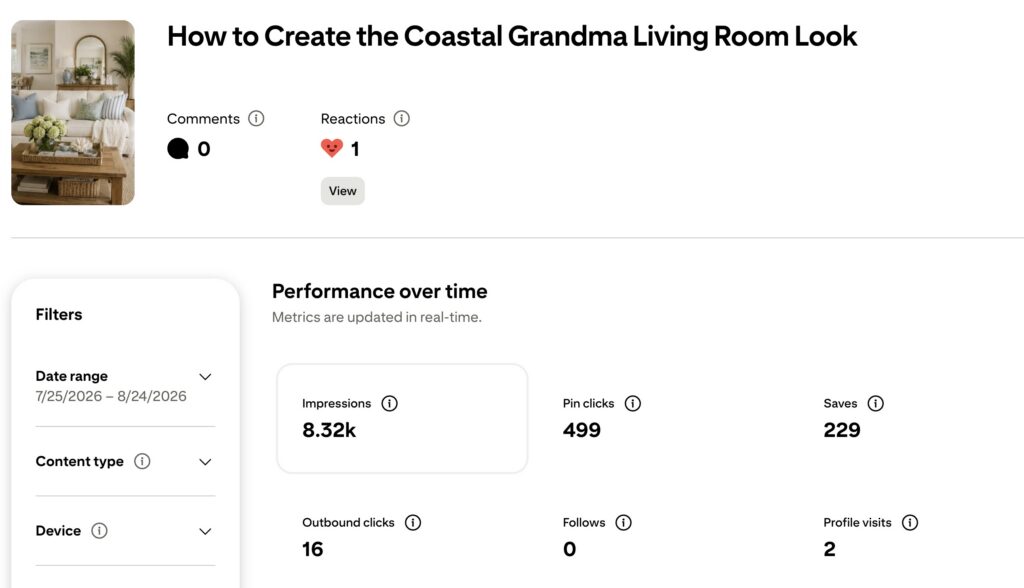
8.32K impressions
499 Pin clicks
229 saves
16 outbound clicks

The save rate was fantastic compared with many of my designed pins.
People were saving it to boards with names like “My Future Home” and “Apartment.”
And suddenly the behavior made perfect sense.
They weren’t necessarily looking at that image and thinking:
I need to read this article right now.
They were thinking:
I want my house to look like THAT.
My Blog Images Are Pinterest Content Too
That discovery changed how I think about the images inside my blog posts.
A beautiful vertical image isn’t just there to make the article look nice.
If Pinterest is pulling images through my RSS feed, that image can become its own Pinterest asset.
So now, especially for home decor posts, I want at least one strong vertical inspiration image that can stand completely on its own.
Pinterest can use that image for discovery.
Then I can create separate designed Pins that give people a reason to click.
In fact, after seeing how well that plain Coastal Grandma image performed, I took the exact same image and created a new Click Pin around it.
Instead of trying to guess which photo Pinterest users would like, I let the analytics tell me.
We’ll see how that experiment goes.
The Numbers That Changed How I Look at Pinterest
This is where it finally clicked for me.
If I looked only at impressions, the Coastal Grandma inspiration image looked like the obvious winner.
If I looked only at Pin clicks, the Coastal Grandma image and Boho infographic looked fantastic.
If I looked only at saves, I’d probably want to make nothing but pretty rooms.
But when I looked at outbound clicks, I got a completely different ranking.
| Pin Type | Impressions | Saves | Outbound Clicks |
|---|---|---|---|
| Coastal Grandma inspiration image | 7.3K | 210 | 15 |
| Boho Picnic infographic | 6.58K | 61 | 5 |
| Ralph Lauren Click Pin | 6.26K | 48 | 72 |
| Coastal Grandma budget Click Pin | 1.76K | 17 | 39 |
The Coastal Grandma budget Pin had less than one-fourth the impressions of the inspiration image—and generated more than twice as many outbound clicks.
That’s when I stopped asking:
Which Pin performed best?
And started asking:
Did this Pin do the job I made it to do?
My Pinterest Strategy Now: Discover, Save and Click
I still use my original three-pin strategy, but I think about the entire Pinterest funnel differently now.
DISCOVER
Beautiful blog images and inspiration content introduce people to the idea.
For home decor, this might simply be a gorgeous room.
SAVE
Useful graphics give people something worth keeping.
Think color palettes, checklists, recipes, shopping lists and visual guides.
CLICK
A strong Click Pin takes the desire created by the other content and gives someone a reason to leave Pinterest.
It presents the outcome or problem clearly—but leaves the solution on the blog.
And my Curiosity Pin can sit somewhere between discovery and clicking, testing a more emotional or unexpected hook.
Don’t Judge Every Pin by the Same Metric
This is probably the biggest update to my Pinterest strategy.
I used to look at a pin with lots of saves and think:
Winner.
Or see a pin with lower impressions and assume Pinterest wasn’t doing much with it.
Now I look at the purpose first.
If I made a Pin to drive traffic, I care most about outbound clicks and outbound click rate.
If I made it to be saved, I care about saves and save rate.
If it’s an inspiration image, I’m interested in reach, saves and whether Pinterest continues distributing it.
And if it’s a Curiosity Pin, I want to see whether people stop, open it and eventually make their way to my site.
A Pin with 200 saves and 15 outbound clicks isn’t necessarily failing.
A Pin with only 17 saves and 39 outbound clicks isn’t underperforming.
They’re doing different jobs.
I put together a few of my go-to pin layouts that you can reuse:
The 3 Pins I’d Create for a Blog Post Today
If I published a new post today, I’d still create three designed Pins:
Click Pin: Give me the outcome or problem, but make me visit the blog for the solution.
Curiosity Pin: Make me stop scrolling because I need to know what happened.
Save Pin: Give me something genuinely useful that I’ll want to find again.
But now there’s one more thing on my checklist:
Make the blog images Pinterest-worthy too.
Because apparently sometimes Pinterest will take a random image from your RSS feed, show it to thousands of people, and teach you something about your own Pinterest strategy.
I wasn’t expecting that part. 😂
More Redcypress Finds


More Practical Guides & Ideas

The Biggest Thing I’ve Learned
You don’t need every Pinterest Pin to do everything.
You need to know what you want that Pin to do before you create it.
Pretty images can create desire.
Useful graphics can earn saves.
Curiosity can stop the scroll.
And a strong unresolved promise can drive traffic.
The Pin with the biggest number isn’t automatically the best Pin.
Know the job before you judge the Pin.
That’s the part of my Pinterest strategy I’m paying much more attention to now.
Lisa Thompson
 Hi, I'm Lisa, a software engineer, photographer, and creator behind Redcypress Designs. I share practical home solutions, beginner-friendly juicing tips, cozy living ideas, Pinterest experiments, and products that solve real everyday problems. Most of the projects, recipes, and reviews on this site come from my own experiences, testing, and occasional mistakes.
You May Also Like
Repurposing Stock Photography to Shoppable Pins
Building The NOLA Beer Bus Live Tracker