Using ChatGPT as My Design Feedback Partner
Because I Don’t Have a Design Team… and My Dog Isn’t Helpful)
I don’t have a design team. I don’t have a marketing manager reviewing my work. And most days, I’m just staring at a Pinterest pin thinking:
“Is this actually good… or do I just like it because I made it?”
So I started doing something a little unconventional — I use ChatGPT as my design feedback partner. Not to design for me. But to help me think more clearly about what I’m creating.
And honestly? It’s been one of the most helpful things I’ve added to my process.
Why I Started Doing This
When I first started making Pinterest pins and blog graphics, I was basically guessing.
- Some pins did well… randomly
- Some I thought were amazing… flopped
- Advice online was all over the place
And I didn’t have anyone to give consistent, honest feedback.
I also didn’t want to:
- text friends every time I made a pin
- join a bunch of groups just to ask for opinions
- or overthink every single design for hours
So I needed something that could give me:
– quick feedback
– honest critique
– help me improve faster
That’s where ChatGPT came in.
How I Actually Use It
This isn’t complicated — I keep it very simple.
1. I Show My Design
I upload my pin or describe it and ask things like:
- “What’s weak about this?”
- “Would this get clicks or just saves?”
- “What’s missing?”
- “Does this feel like a scroll-stopping pin?”
Sometimes I already know something is off… I just can’t pinpoint it.
2. I Ask for Improvements
This is where it really helps.
I’ll ask for:
- stronger hook ideas
- better wording
- layout suggestions
- different angles (problem vs aesthetic vs curiosity)
For example:
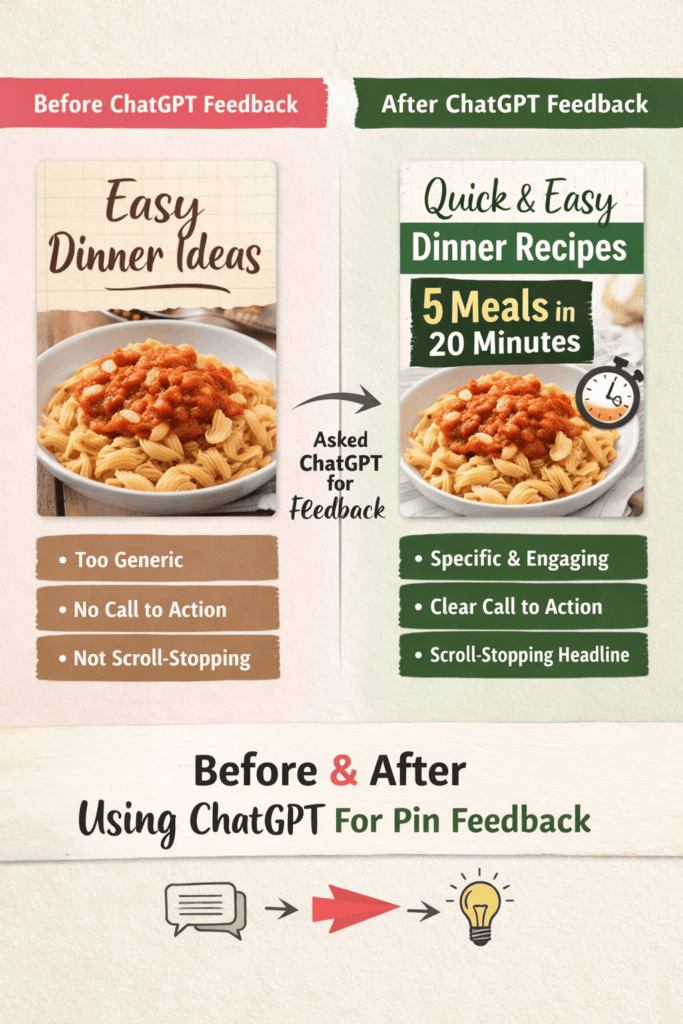
- turning a “pretty pin” into a problem-solving pin
- or making the text actually give someone a reason to click
3. I Iterate (A Lot)
I’ll create:
- Version A
- Version B
- Sometimes Version C (because I’m stubborn)
Then compare:
- Which one feels clearer?
- Which one makes me want to click?
This part has probably improved my designs the most.
What This Helped Me Realize
This is where things started to click for me.
Not Every Pin Has the Same Job
Some pins are meant to:
- get clicks
- get saves
- or just build awareness
And I used to treat them all the same. See my post about my exact strategy.
“Pretty” Doesn’t Always Mean Effective
This one hurt a little. Some of my nicest-looking designs… didn’t perform at all. Meanwhile, simpler pins with a strong hook? way better results
The Hook Matters More Than I Thought
I used to focus mostly on:
- colors
- layout
- fonts
Now I focus way more on: what the pin is actually saying
I’m Still Learning (And That’s Fine)
Not every suggestion is perfect.
Sometimes I ignore it.
Sometimes I tweak it.
And sometimes I look at my design and think:
“Yeah… that is exactly what’s wrong with it.”
Real Talk: It’s Not Magic
This isn’t a shortcut or a hack.
It doesn’t replace:
- creativity
- taste
- your own judgment
But it does help you:
- see your work more objectively
- get unstuck faster
- improve without needing a whole team
Why This Works So Well (Especially If You Work Alone)
If you’re creating content by yourself, you probably know the feeling:
You’re too close to your own work.
Everything starts to look:
- fine
- confusing
- “maybe it’s good???”
Having something that can:
- challenge your thinking
- suggest alternatives
- and give quick feedback
is incredibly helpful.
Final Thoughts
I don’t use ChatGPT to replace my creativity.
I use it to:
– refine it
– question it
– improve it
It’s basically the design feedback partner I didn’t have.
And honestly…
it’s made creating feel a lot less frustrating.
💡 If You Want to Try This
Next time you make a pin, try asking:
- “Would this make someone click?”
- “What’s unclear about this?”
- “How can I make this stronger?”
You might be surprised what you notice.
If you’re curious, I share more of what I’m testing and learning here:
Lisa Thompson
 Hi, I'm Lisa, a software engineer, photographer, and creator behind Redcypress Designs. I share practical home solutions, beginner-friendly juicing tips, cozy living ideas, Pinterest experiments, and products that solve real everyday problems. Most of the projects, recipes, and reviews on this site come from my own experiences, testing, and occasional mistakes.
You May Also Like
Pinterest Was Turning My Amazon Product Images Into Pins — Here’s How I Stopped It
From Flash Animations to WordPress: Websites I’ve Built Over the Years